Engine build sheet
A build sheet that can refuse to be signed
A spreadsheet accepts any number you type into it. This one holds the limits for the engine on the bench, judges every reading as it goes in, and blocks sign off on a part that finished past its service limit. Each check in it was written after a real job sheet let something through.
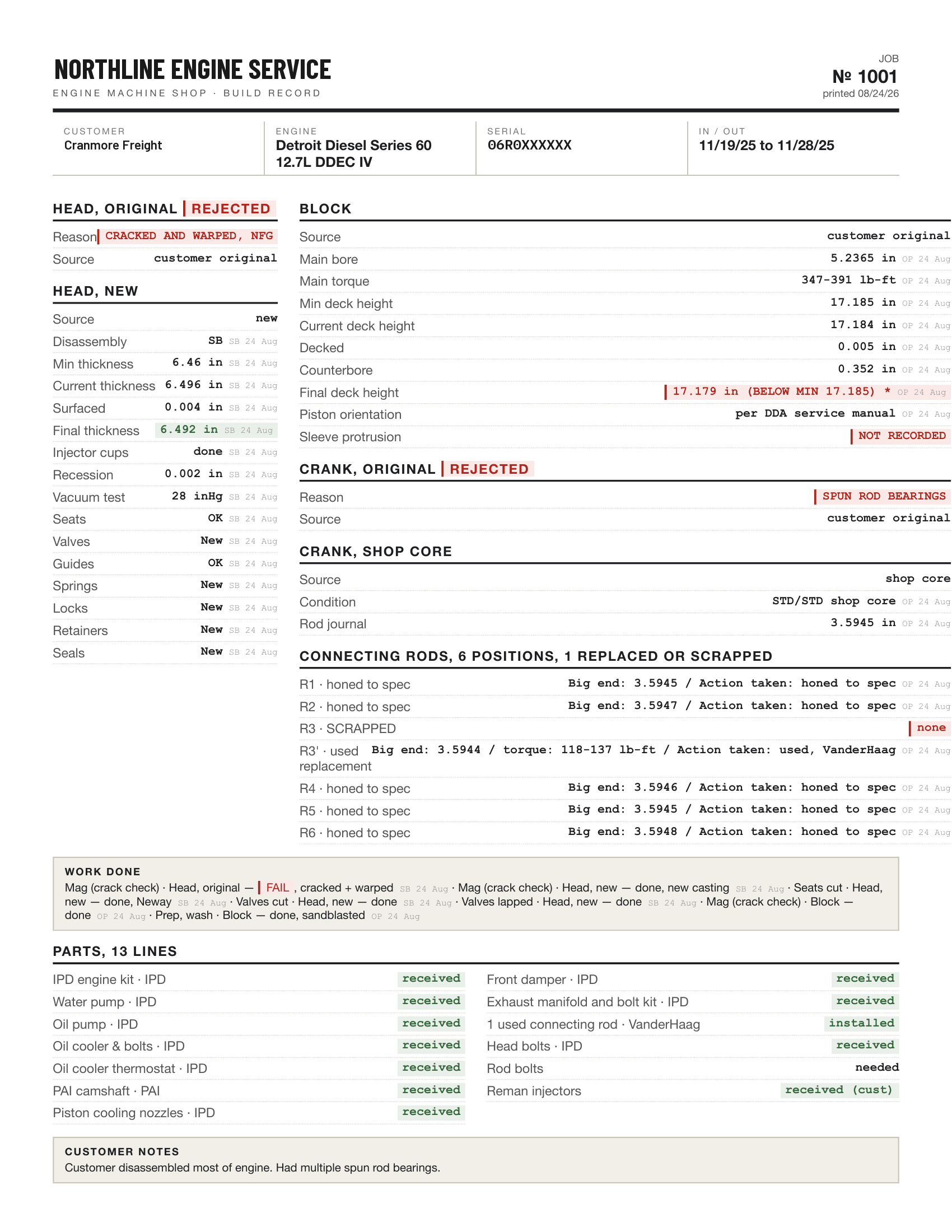
The sheet that went out with the engine
Section 02
Four failures, on two finished sheets
These are not hypotheticals about spreadsheets. They are what two completed job sheets from a working engine shop turned out to contain when somebody read them closely. Every rule in the app was written for one of them.
-
Failure 01
A finished part went past its service limit and nothing said so
Minimum deck height on that block was 17.1850. It came in at 17.1840, already under. It was decked another 0.0050 and finished at 17.1790, about six thousandths below the limit. The sheet took all three numbers without comment, because a spreadsheet has no way to say no.
-
Failure 02
Safety critical fields shipped blank
That engine is a wet sleeve Series 60 and it left with no sleeve protrusion recorded, which is the measurement that shows whether a low deck is still serviceable. The crack check box was empty on both sheets, on a job whose original head was cracked and warped.
-
Failure 03
A typo survived to the end
A cylinder bore was written down as 4.0530 against a standard of 4.0551. A bore wears larger, never smaller, so a digit had been lost somewhere between the gauge and the box. Nothing in the sheet knew which way a bore is allowed to move.
-
Failure 04
The record contradicted itself
The head was dated finished ten days after the engine was finished. Two questions written down at teardown, one about rod bolts and one about an injector part number, were still unanswered on the copy that went out with the engine.
Section 03
How it works
Five minutes of a job, from the counter to the printed sheet the customer keeps.
-
Create
Customer, engine, serial, and which of your travelers this job runs on. Four sheets ship: diesel full rebuild, heads only, crank only, and short or long block. The job takes the next number in your shop and pins the version of the sheet it was created under, so editing a sheet later never changes what the engines already on the bench are being asked.
-
Measure
A tech works one field at a time with gloves on. The first job of an engine model asks for the limits out of your own book, the same lookup the paper sheet needs. The reading is judged against them as it is typed, and the limit that judged it is stored on the reading, so correcting the book later cannot rewrite what an old job was found to be.
-
The check
The screen judges the reading against its limits as it is typed, so a tech is told a value is below limit before the gauge goes down. The verdict that decides anything is the server's, taken over the whole job at sign off. A bad number always saves, and the button says Save as-is, because holding the value back would only teach the bench to keep it off the record.
-
Sign off
A manager signs. If a hard stop is open the sign off comes back refused, naming every finding that stopped it. Each one is corrected or overridden, and an override takes the manager PIN and a written reason.
-
Print
The traveler renders on the server, so it is the same document from every device. Values print with the initials of whoever took them and the date, out of limit values print next to the limit they broke, a required field nobody filled prints as NOT RECORDED, and photos are embedded in the file rather than linked.
Section 04
What the sheet refuses
Eleven checks are built in. A hard stop blocks sign off. A warning goes on the job, on the board and on the printed sheet, and lets the engine leave. Four of the eleven stay quiet until the job says it is finished, because a rule that paints a fresh job red teaches a shop that red means nothing.
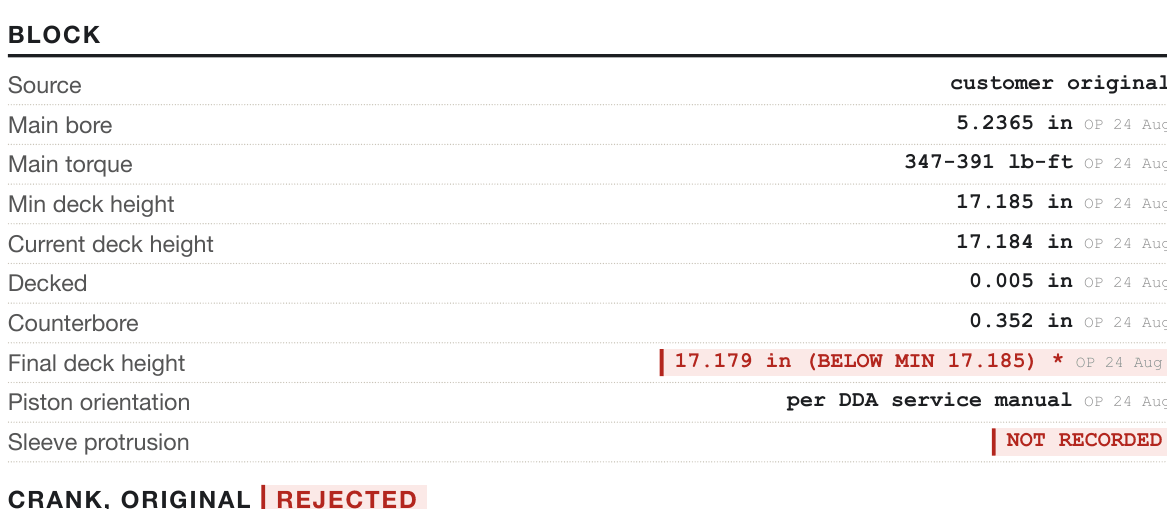
Cranmore Freight
The job from the top of this page, on the screen instead of on paper, with the rule engine's verdict on each reading. R2 caught the deck height and R4 caught the measurement nobody took.
| Rule | What it stops | As shipped |
|---|---|---|
| R1 | A head finished below the minimum thickness for that model | Hard stop |
| R2 | A deck height finished outside its range, or total removal past the cap for that engine | Hard stop |
| R3 | Any measurement outside the limits it was judged against | Hard stop |
| R4 | A field this engine requires left blank, sleeve protrusion on a wet sleeve engine among them | Hard stop |
| R5 | A head or block staying in the engine with no crack check on record | Warning |
| R6 | Questions written down at teardown and never answered | Warning |
| R7 | A reading that moved the direction the part cannot wear, which is usually a lost digit | Warning |
| R8 | A part that finished exactly on its limit, with nothing left for the next rebuild | Warning |
| R9 | A component dated finished after the engine was finished | Warning |
| R10 | A part you rejected whose measurements are still driving the record | Warning |
| R13 | A section of the traveler with no part on the job to fill it in | Warning |
R9 is honest about its own reach. It reads component dates that arrive with imported history, and no screen in the app asks a tech for a component finished date yet, so on a job created here it has nothing to read. It is listed because it is in the engine and because the failure it was written for is real. Do not count it as cover you have today. R11 and R12 are missing from the table because they are not checks: every value records who entered it and when, and a correction never overwrites the reading it replaced.
Softening a rule is not switching it off
A shop can grade any rule down to a warning from the Rules screen without waiting for a release. R1 to R4 stop there. Softened, a rule still fires, still shows on the job and still prints on the traveler, and all it loses is the power to block a signature.
Off is different in kind, and that is why those four cannot go there. Off asks nobody and leaves no mark on the job or on the paper, so a block finished under its minimum would print on a clean sheet. The per job escape hatch is an override, and an override has a name on it.
An override is a record, not a dismissal
When a part is out of limit and the shop decides it will run, a manager clears that one finding with the manager PIN and a written reason. It prints on the traveler, so the customer copy and the warranty file both carry it. It is bound to the numbers it was granted against, so if the measurement changes afterwards the finding comes back and the old override stays as history. There is no way to edit one and no way to delete one.
The overrides report is there for the question that follows. A rule your shop overrides on every job is a rule that is wrong for your shop, or a limit in your library that is wrong for that engine.
Checks you write yourself
A shop can add its own checks in four shapes: a field that must be filled in, a value that must fall between two numbers, a value that must sit a stated way against another field, and a value that must be one of a list of words. There is no rule language on purpose, because a check has to read back as one sentence to the person who wrote it. Yours behave like the built in eleven, findings and sign off included.
Section 05
When the Wi-Fi dies
Every shop has a corner where the signal goes. The question a tech actually asks there is not whether the app works offline. It is whether the reading they just typed is anywhere, and who it belongs to.
The write stays on the device
Not only the writes that paused when the phone admitted it was offline. Weak shop Wi-Fi is worse than no Wi-Fi, because the phone still calls itself online while the request fails. Those are kept too, so a reload cannot lose them.
It says whose it is
A queued write carries the name of whoever typed it. If a different tech has signed in on that tablet by the time the signal returns, the write waits for its author instead of going into the record under the wrong name. A misattributed reading in a warranty file is worse than a late one.
It sends once
Each write is stamped with a key when it goes into the queue and keeps that key through every retry, so a write that reached the shop before the connection died lands once rather than twice.
A refusal is not a retry
When the shop record turns a write down, the bar says so in the server's own words and offers to discard it. Retrying would only fetch the same answer, and the useful thing at that point is to go and find the manager.
What the bar at the bottom of the screen says
connection lost 02:14 ago. 3 writes saved on this device, and they will send when you're back
It counts the outage rather than showing a symbol, because the useful question is how long this has been going on. Tapping it opens the list of what is waiting.
What it is not
It is not a copy of the shop's records on the tablet. Readings always come from the network, since a stale measurement shown as current is worse than no measurement at all. A job you have never opened on that device cannot be opened with the signal down, and the app says exactly that rather than showing the browser's error page.
One more thing worth knowing before it happens to you. A write that waited in a dead spot can land on top of a reading somebody else took later, because the value that wins is the one from whichever device reconnected last. Nothing is lost when it does, the earlier reading stays on the record, and the person whose write landed late is told what it replaced, by whom, and how long before. The notice stays until they dismiss it.
Section 06
Questions
Does the customer need an account or an app?
No. The link in their email is the way in. Nothing to install, no password to forget, and nothing for them to be locked out of. If the link stops working they ask you for another one.
Can we turn a rule off?
Any rule can be graded down to a warning by the shop, and R1 to R4 stop there. A softened rule still fires, still shows on the job and still prints on the traveler. All it loses is the power to block a signature. Switching one of those four off entirely would leave no mark anywhere, and a part finished under its minimum would print on a clean sheet.
What happens when a part is out of limit and we decide to run it?
The measurement saves either way, because a record that refuses bad news is worse than one that reports it. Sign off is then refused until a manager clears that finding with the manager PIN and a written reason. The override prints on the traveler, it cannot be edited or deleted, and if the measurement changes afterwards the finding comes back.
Does it work when the shop Wi-Fi drops?
What you type is kept on the device and sends itself when the connection returns, and the bar at the bottom of the screen says how long the connection has been gone and how many writes are waiting. It is not a copy of your records on the tablet. A job you have never opened on that device cannot be opened with the signal down, because a stale reading is worse than no reading.
Our sheet is not your sheet. Can we change it?
Yes, and a shop changes it without us. The fields are data rather than code, so a manager can add, remove and reorder them. Publishing an edit creates a new version and every job stays on the version it was created under, which means the sheet can change while engines are on the bench. A published sheet also cannot drop a field one of the rules is reading, since that is how a sheet edit would otherwise disarm a check with nobody noticing.
Who else can see our jobs?
Your shop has its own address and its own data, and every query the application makes is filtered by shop. Asking for another shop's job answers 404 rather than 403, because a 403 would confirm the job exists. Two tests hold that shut: one reads the source and fails the build when a query forgets the shop, and one runs two shops side by side and tries every endpoint from the wrong one.
What does the customer actually get?
A traveler rendered on the server, so it is the same document from every device and every printer. Values carry the initials of whoever took them and the date. An out of limit value prints beside the limit it broke, a required field nobody filled prints as NOT RECORDED, a component you rejected prints as rejected with the reason, a question nobody answered prints as unanswered, and every override prints with the manager's name and their reason. Photos are embedded in the file, so the copy in the warranty folder still shows its evidence years later with no server to fetch from.
Can our customers see the job themselves?
Yes, once a manager switches it on, and it is off until somebody does. You send a link for one job and they open it on their phone. They see the stage the engine is at, the photographs you have marked for them, anything you have asked them to answer, and a way to write to you. The link belongs to that job and you can revoke it.
What can a customer see, and what stays ours?
You choose, per job. They see the work you have shared and where it has got to. Your bench notes, your hold reasons and anything you have not shared stay yours. There is a separate field for what you do want the customer to read, rather than a tick box on the note you wrote for yourself, because one forgotten tick is one customer reading something about themselves.
Can they message us, and does something answer for us?
They can ask a question and their reply lands on the job rather than in somebody's inbox, so whoever opens that engine next reads it without being told. They can reply to the email instead if that is easier. The assistant answers only from what is already on their screen and it tells them that is what it is doing. Anything it cannot answer goes to you. It never quotes a price, accepts a change to the job or promises a date.
What does the customer portal cost?
Nothing beyond the $89 today, and there is no charge per customer or per link. There is no allowance to run out of. If the portal stops working for your customers, it is because the shop is behind on payment.
Can we get our own data out?
Jobs, cores that finished at or past their limit, parts still on order and every override are each a CSV download from the screen you are already looking at, filters included. The at limit report is the one worth knowing about before you need it, because it answers which cores not to accept back.
Where to start
The pilot has not run yet, so this page claims nothing about hours saved or scrap avoided. What it claims is what the software refuses, and every one of those refusals can be read in the code. The pricing page explains the trial and what is in it.